
HIPAA and Minimum Necessary Disclosures

HIPAA regulations state that when using or disclosing PHI (protected health information) or when requesting PHI from another covered entity (a doctor’s office, dental practice, etc), a covered entity must make reasonable efforts to limit PHI, to the minimum necessary, to accomplish the intended purpose of the use, disclosure or request.

So how do we accomplish the goal of limiting our PHI access and requests to the minimum necessary level? We look at three basic areas: levels of access to PHI, requesting PHI, and sending PHI.

Giving employees specific levels of access to PHI

Each employee should have just enough access to your medical record system to do their job. For instance, an employee who only answers the phone and sets appointments doesn’t generally need access to medical histories, x-rays, and other specific medical information. Therefore, their level of access to your practice software should be limited to seeing the schedule and creating or changing appointments. Alternatively, an employee who only treats patients and never handles billing information should not have access to credit card numbers, health insurance plan ID numbers, or other financial information in your systems.

It may seem easier to just give everyone access to everything. However, consider the consequences of taking that shortcut. If any one of your employees’ software login were to be leaked or guessed by an outside individual, that person would have access to every single piece of information in your records system. A breach like that could cost hundreds of thousands of dollars in fines, costs to notify patients, and credit monitoring fees for affected patients.

Requesting specific amounts of PHI from others

Many practices depend on patient referrals from outside practices. When taking these referrals, often medical information is sent over either electronically or via mail. When working with an outside practice, you should only ever request the minimum amount of PHI to perform the care you have been tasked with. If a patient is coming to you for a specific procedure like a root canal or a surgical procedure, it may be tempting to ask for the entire history of care from the outside practice. However, you’ll likely only need the recent x-rays and other information pertinent to that patient’s current ailment. Limiting the amount of PHI you ask for limits your liability in a situation where a medical record was breached in transit. If PHI gets lost in the mail, that is considered a breach. Accordingly, the more information contained therein, the higher the possible fine from the Office for Civil Rights in the event of a breach.

Sending specific amounts of PHI to others when requested

Most practices refer patients to specialists when a patient needs a procedure outside of the practice’s area of expertise. When doing so, the outside specialist will likely request information about the patient: x-rays, medical histories, insurance information, etc. Therefore, it is important that you and your employees understand the difference between a routine request for information and a non-routine request for information. A routine request for information is the type of request you see all the time. The request is for the right amount of information for the third party specialist to perform their procedure.  And the request shouldn’t make you question why they are asking for that specific information.

Alternatively, there are non-routine requests for information. These requests may be for entire medical histories or a specific piece of information you’ve never been asked for. Or the request may be because of an unusual referral situation your practice doesn’t see very often. In these situations, your employees should take a moment to ensure that all of the information requested is really necessary to perform the procedure or care for the patient effectively. Furthermore, if your employee doesn’t agree with the magnitude of the request, they should communicate with the third party and ensure that a particular piece of information is really needed. Only if the third party can give you a compelling reason for needing the information should you make the exception and send it to them.

J.J. Micro’s PracticeProtect platform helps your organization understand and follow HIPAA regulations like minimum access to PHI. Give us a call today at 636-556-0009 to schedule a free risk assessment.


OCR Announces Fines for Breaches Affecting Fewer Than 500 Patients

As a HIPAA compliance IT consultant I work with many small dental and medical practices that are affected by HIPAA regulations. For many years, dental practitioners and boutique medical service providers have been able to fly under the radar of the OCR (Office of Civil Rights) and not worry about audits or fines resulting from breaches. However, in 2016 the OCR began to perform random audits of all covered entities and their downstream business associates. And with the new announcement that the OCR will issue fines for breaches affecting 500 or fewer patients, we will see an even bigger focus on HIPAA compliance from these small practices.

Our service offering, PracticeProtect, has seen a recent uptick in sales as more medical service providers are made aware of the dangers of non-compliance. Where practice owners were once unconcerned with the possibility of an audit and thus lax with their security policies, we are now seeing a strong focus on compliance. Many practice owners have spent so long not focusing on compliance that they aren’t aware of just how non-compliant they are. Our first visit with a new client includes an initial HIPAA risk assessment where we cover twenty topics that are usually problem areas for a small practice. We generally find that practices are initially compliant in less than five of those twenty areas.

There are considerable investments in both time and money to become compliant. Many practices have weighed the cost/benefit ratio before and found that the risks weren’t great enough to warrant the investment. But that cost/benefit ratio is changing and I believe more and more practices will be investing in compliance over the next few years.

Read here about the first case where the OCR issued a fine for a breach that affected less than 500 patients. A laptop containing 441 patient medical records was stolen. At the time, the organization that owned the laptop had not performed a HIPAA security risk assessment, nor did they have any policies or practices in place to prevent a breach like this one. Simply encrypting the data on the laptop and password protecting the encryption would have stopped this breach. Because the organization had no procedures in place, the OCR levied a $50,000 fine. Since the breach occurred in 2010, that organization has brought itself into compliance. But they could have avoided the breach and the fine all together if they had been prepared for this. The likely cost of compliance would have been a fraction of the fine they paid.

If you are a small medical or dental practice, let J.J. Micro perform a free HIPAA risk assessment to find out where you stand with HIPAA compliance. There are no strings attached to this risk assessment. You are free to do what you like with the information we provide. We are not government auditors and do not report any security risks to the OCR. We are only here to help you bring your business into compliance.

The Importance of Encryption for HIPAA Compliance

Encryption. . .what does it mean to encrypt something? Why is it important? And why is it particularly important for covered entities and business associates in the health services industry? What can you do to make sure your data is encrypted while it is being transferred from one place to another and while it is at rest on servers and backup drives? These are all questions I am asked regularly when I do initial HIPAA risk assessments and audits. My clients tend to downplay the importance of encryption initially until they fully understand the risks of not encrypting data properly.

Encryption is defined as the translation of data into a secret code. Encryption is the most effective way to achieve data security. To read an encrypted file, you must have access to a secret key or password that enables you to decrypt it. If you were to send a file across the internet in a non-encrypted format, it could be intercepted anywhere along the way and you would have no idea that your data had been breached. Additionally, if you were to store data on a storage device in a non-encrypted format, and that device was lost or stolen, your data would be accessible to anyone. Using encryption nullifies both of those scenarios by only allowing someone with your secret encryption key to decrypt the data and read it.

For the purposes of HIPAA compliance, encryption is absolutely necessary for one particular category of data: protected health information (PHI). This includes patient medical records, personal patient information like phone numbers, addresses, and social security numbers. Encryption of PHI is important for a few reasons. First, and foremost, you have a duty to your patients to keep their personal information safe from unauthorized access. One quick way to lose patients and your practice is to betray patient trust. Additionally, as a covered entity or business associate you are bound by federal law to protect PHI from breach or loss. The Office of Civil Rights has the authority to fine you up to $50,000 per record breached or lost if they deem that you haven’t implemented and followed a good faith HIPAA compliance plan.

email encryptionWhat is a practice to do? How can you be sure your PHI is encrypted? There are three places you’ll want to double check for encryption. During our HIPAA audits we most commonly find that practices aren’t employing encryption when emailing patient health records to other practices or to the patients themselves. This is a fairly easy problem to fix. There are a multitude of available email encryption services such as Virtru, Office 365 Encrypted Email, and Hushmail. These services generally integrate directly into your browser or Microsoft Outlook so that it’s as easy as pressing a button to convert any email into an encrypted email that requires the user at the other end to verify their identity to receive the email.
It is more complicated to find out if the other two categories have HIPAA compliant encryption enabled. These two areas are data stored on devices like servers, desktops, laptops, and mobile phones. And separately, data stored on backup devices and backed up to the cloud. You will want to contact a HIPAA compliant IT specialist to verify that your devices and backup storage is HIPAA compliant. An IT specialist can tell you what level of encryption you are using and whether the encryption is turned on and configured properly. Additionally, in the case of a cloud backup service, the IT specialist can make sure that the cloud provider is HIPAA compliant themselves and is willing to sign a Business Associate Agreement (BAA) for your practice and share some of the liability for storing that sensitive data.

J.J. Micro IT Consulting is available for a free HIPAA risk assessment. During that assessment we will look for proper encryption methods in addition to possible HIPAA compliance issues in the categories of security, privacy, and administrative procedures. Please give us a call at 636-556-0009 to schedule an appointment today.

HIPAA Audits Are Coming To Dental Practices

Starting in February of 2016, the Office of Civil Rights (a division of the US Department of Health and Human Services) began phase 2 of the HIPAA audit program. What does this mean for dental practitioners and other health service providers? What does a health service provider need to do to be prepared for an audit? And what happens if a provider isn’t prepared?

Let’s start with a little bit of history on HIPAA audits. In 2011 the OCR began Phase 1 of the HIPAA audit program. They selected 115 covered entities to audit for HIPAA compliance. A covered entity is defined as:  health plans,health care clearinghouses, and health care providers who electronically transmit any health information in connection with transactions for which HHS has adopted standards. At the time, they weren’t worried about Business Associates or other tangentially related businesses. These audits were very targeted and didn’t affect most health practitioners.

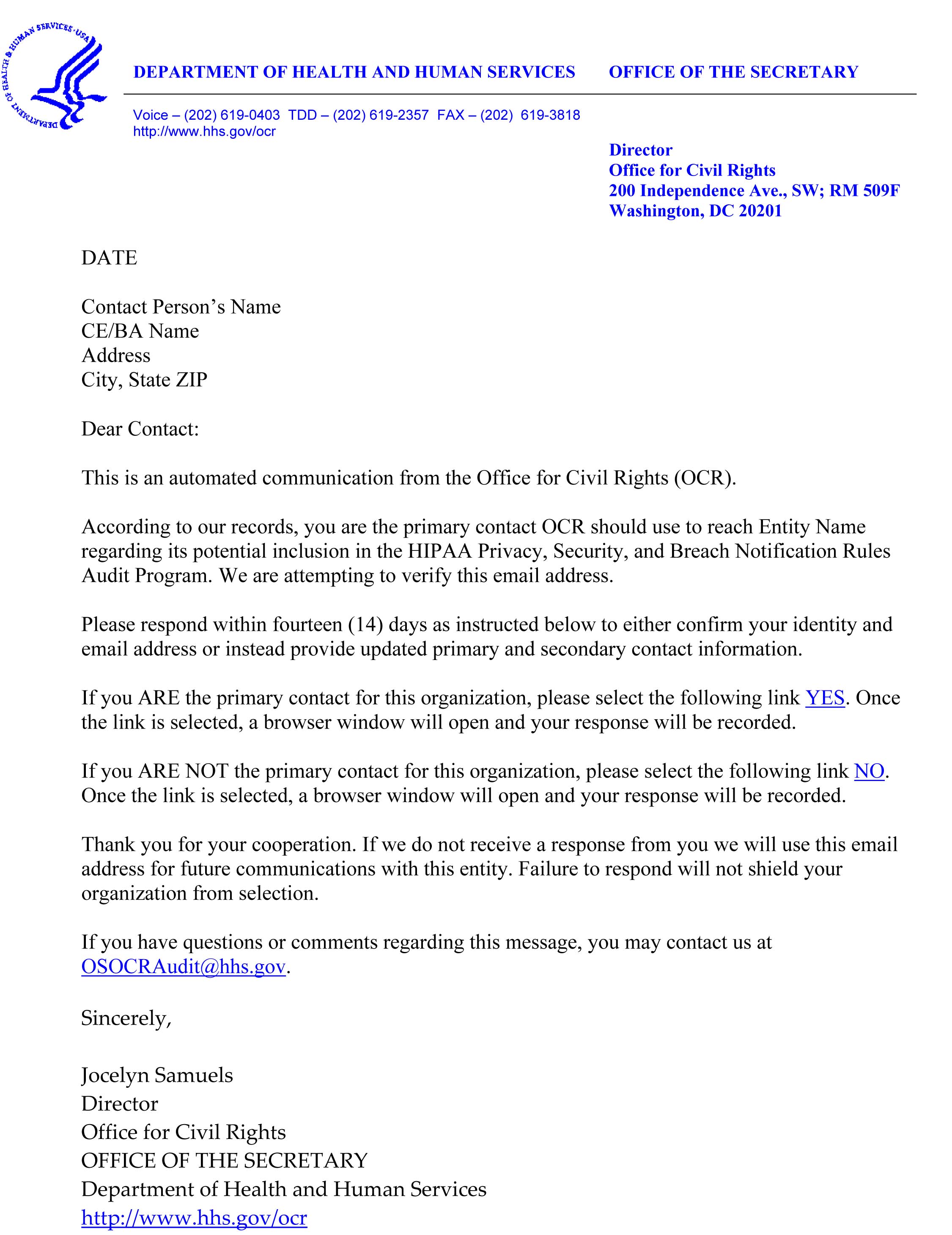
Microsoft Word - Address Verification Email.docx
OCR Sample Contact Letter

Fast forward to 2016 and the OCR has begun Phase 2 of this audit program. Instead of targeting just 115 providers, they are now compiling a comprehensive list of all medical service providers in the United States and will be reaching out to each provider via phone, mail, or email. Click here to view a sample contact letter. Once they add you to their list, they will make contact to find out who your HIPAA compliance officer is and ask for your HIPAA compliance documentation. They will expect you to have comprehensive documentation that generally adds up to somewhere between 50 and 150 (sometimes more) pages of legal documents, policies, training records, and other documentation.

You should already have a binder that contains all of this documentation ready to go. Part of being HIPAA compliant is being able to prove that you are HIPAA compliant. When performing HIPAA risk assessments for our clients, we generally find HIPAA documentation to be lacking or non-existent. If you don’t already have a HIPAA compliance binder, start one today. You’ll need copies of all of your policies surrounding HIPAA, records of employee HIPAA trainings, results of recent and regular internal HIPAA audits, and other documentation. If you don’t know where to start, contact J.J. Micro at 636-556-0009. With our PracticeProtect™ offering, we will help you every step of the way towards full compliance and documentation.

What happens if you are contacted and you aren’t ready for an audit? The OCR will give you 10 business days to respond with your documentation. If they don’t receive your documentation within 10 days, they will schedule a site audit. During a site audit, they will still want to see all of your documentation, but they will also want to interview your employees and look for any potential breeches or lack of documentation. From there, they will begin levying fines based on the severity of potential breeches. Benign issues could be $100 per issue, serious issues can be up to $50,000 per issue.

On average it takes somewhere between three and six months for one of our clients to go through the process of becoming HIPAA compliant. Do not wait until you are contacted by the OCR to begin the process. 10 business days is not enough time to gather all of the information, come up with your own policies, document everything, and provide the proper training for all of your employees. Get started now with PracticeProtect™!

HIPAA Compliance for Dental Office Managers

J.J. Micro works with a variety of dental practices in the Saint Louis area. We offer a HIPAA compliance as a service package called PracticeProtect™ that brings practices into HIPAA compliance and provides the IT support that all 21st century practices are in need of.

When we first started working with dental practices, we focused all of our HIPAA compliance remediation on the technology side of the business. We were mostly concerned with preventing breaches caused by improper security protocols, lack of encryption, and unsecured networks. But as we started becoming HIPAA certified ourselves, we realized that we were missing about half of the HIPAA compliance equation: the administrative side of HIPAA.

While performing internal HIPAA audits for our clients, we have found that many practices are missing some of the most basic requirements of HIPAA. Things like simple documentation, annual employee HIPAA trainings and refreshers, and many practices even lack a designated HIPAA compliance officer. This led us to design PracticeProtect™ around these failures so that we could offer a solution that automates many of these requirements so doctors and practice managers can focus on providing the best care for their patients.

The purpose of this article is to go over some of the most commonly missed items so that as a practice manager, you can know whether you are HIPAA compliant or not. With the OCR scheduling surprise audits starting in 2016, all covered entities (like dental practices) are at risk of hefty fines if they can’t prove they are HIPAA compliant. Let’s go over some of these commonly missed compliance gaps so that you can work on a plan to become compliant yourself.

HIPAA Documentation Binders

The most commonly missed and arguably most important item to have in an audit is documentation. If an auditor calls, emails, or shows up at your office, the first thing they will ask you for is your HIPAA binder. They will want to see that you are documenting everything from your privacy statement for patients to your record of when each employee last took their HIPAA refresher training. If you don’t already have a HIPAA binder, you should start one today. If an OCR auditor asks you for your HIPAA binder and you don’t have one, they are much more likely to do a full audit and start handing out fines. A thorough HIPAA binder will likely be about 25 to 75 pages and will be updated regularly.

Annual HIPAA Training for your Employees

Many practices do take the time to do occasional HIPAA trainings for their employees. However, we find that it’s not unusual for there to be long lapses in between trainings. HIPAA compliance laws require regular documented training of existing employees and initial training for any new employee. Most experts agree that even though there is no set time limit for regular training intervals, one year between each training should be the maximum. In addition to ensuring these trainings take place, you will need a signed document from each employee each time they take the training so that you can prove to an auditor that each employee understands what is required of them in regards to HIPAA compliance.

BAAs (Business Associate Agreements)

If you do business with any outside vendor that comes into contact or potentially comes into contact with PHI (protected health information), you will need a BAA signed and on file with each vendor. A BAA holds vendors accountable to properly handling your PHI to prevent breaches or losses. Examples of vendors that would require a BAA are IT service providers, insurance billing providers, document shredding handlers, contractors, accounting services, outside janitorial crews, online data backup services, cloud server providers, and email encryption services. Every BAA should be on file in your HIPAA binder and will need to be reviewed annually to ensure that new HIPAA laws aren’t being ignored.

Designated HIPAA Compliance Officer

HIPAA standards require that your practice nominate a HIPAA compliance officer. It is this person’s duty to ensure that the practice is following HIPAA compliance laws in all areas. This person will keep the HIPAA binder up to date, ensure employees are taking their trainings, and be a general watchdog to ensure that employees are handling PHI with care. Most commonly this responsibility falls on the practice manager. If the OCR contacts your practice about a HIPAA audit, lack of a HIPAA compliance officer will be a big red flag.

Regular HIPAA Security Reviews

HIPAA laws require that your practice regularly perform a self audit to address any new gaps that may have opened regarding your HIPAA compliance. Again, most experts agree that regularly in this case refers to yearly. In addition to doing a full internal HIPAA audit yearly, you must document your findings and document any remediation steps you took. This should all be in your HIPAA binder. If the OCR asks for your HIPAA documentation and doesn’t find any information about an internal audit in the last 12 months, that is another big red flag.

Record Retention and Disaster Recovery Plan

An important and often overlooked aspect of HIPAA compliance is record retention and disaster recovery. The state of Missouri requires your practice to keep patient medical records on file for 7 years. If you were to lose any of those medical records during that 7 year period, it would be considered a breach and you would be subject to fines of up to $50,000 per record lost. For this reason, it’s important to have a good backup plan and a documented disaster recovery plan. Do you have a document that outlines what exactly will take place if your building was lost in a flood, tornado, or fire? An auditor from the OCR will want to see that you have a documented step-by-step plan to recover all patient records from an off-site backup.

PracticeProtect™

Time and time again we have found that doctors, dentists, practice managers, and other staff just don’t have enough hours in the day to stay focused on HIPAA compliance. With PracticeProtect™ we automate as many of the steps as we can. You will still need to understand HIPAA compliance and follow security standards to ensure PHI is safe. But employee training, writing BAAs and reviewing them annually, designing privacy forms for your patients, sending patient records over the internet using encryption, performing security audits, and all of the hundreds of other small details will be available to you in a simple and easy to use web platform. J.J. Micro will design a customized compliance plan for your practice and help you follow that plan to maintain compliance. With PracticeProtect™ you can know that even when a new HIPAA law is passed or when HIPAA rules are changed, your plan will be updated accordingly. You will no longer have to worry about a surprise HIPAA audit. When they ask for your HIPAA binder you can hand it to them and smile knowing there won’t be any issues.

Give J.J. Micro a call today at 636-556-0009 to schedule your free, no strings attached, HIPAA compliance check. We can help you decide if you are compliant or if you need PracticeProtect™.

Click here to learn more about PracticeProtect™.

HIPAA Compliance for Dental Practices and Their Business Associates

For almost 20 years since the Health Insurance Portability and Accountability Act (HIPAA) came into existence, the health care industry has had to deal with increasingly complex layers of regulations. Dental practices are acutely affected by HIPAA, namely by the recently added rule that holds a dental practice responsible for the security procedures of any company or individual it does business with.

With the increasing complexity of regulation and the huge possible fines for noncompliance, many dental practices find that working with a third-party company that is already an expert on HIPAA compliance is the the best way to stay in compliance. Below I have given an overview of the issues, and shown why working with a company like J.J. Micro LLC IT Consulting can eliminate the fear of HIPAA compliance for your practice.

BASIC HIPAA REQUIREMENTS

The HIPAA Privacy Rule, effective since 2003, is probably familiar to most dentists. This rule gives patients various rights regarding their protected health information (PHI). These rights include the right to change what is in their records and to limit the sharing of these records. The HIPAA Security Rule, (2005), relates to a dental practices’s management of its patients’ electronic health records (EHRs) and mandates a set of ongoing, practice wide, security protocols. These protocols include staff education, regular risk audits, secure redundant backups, email encryption, and documentation of these protocols. An Enforcement Rule (2009) and a Breach Notification Rule (2010) added more requirements regarding when the media has to be alerted to a breach and what kinds of civil penalties can be levied. As stringent as these regulations are, they seem simple to follow when compared to the HIPAA Privacy and Security Omnibus Final Ruling from January of 2013.

YOU ARE NOW RESPONSIBLE FOR YOUR CONTRACTORS

The Omnibus Final Ruling strengthens and expands the regulations enacted previously. But it also adds another level of regulations that make a dental practice responsible for the security protocols of any outside entity it does business with. HIPAA calls these outside entities Business Associates. These are entities such as a collection agency, a document storage or disposal company, billing providers, and IT service providers. Every dental practice must keep on file a Business Associate Agreement (BAA) that outlines who is allowed to be in contact with protected health information (PHI) and what is allowed to be done with that information. If a dental practice were to give a 3rd party access to PHI without a BAA in place, the practice will be liable for any non-compliance penalties.

LET AN EXPERT HANDLE YOUR INFORMATION TECHNOLOGY HIPAA COMPLIANCE

You’re dedicated to providing the best possible care for your patients. This probably takes up the vast majority of your time. With an already busy work schedule, why spend time trying to be your own IT manager. As time goes on, privacy and security laws will only continue to become more complex. Let J.J. Micro LLC IT Consulting stay abreast of the changing state of HIPAA compliance regulations and leave you and your staff to what you do best, caring for patients. Contact J.J. Micro today to schedule a free HIPAA compliance checkup. We will help you develop a plan to become compliant and then keep you in compliance going forward.

For more specifics on the ways J.J. Micro will help you become HIPAA compliant, read our article on HIPAA compliance IT recommendations

And here is more information about HIPAA compliance from the American Dental Association. 

IT Related HIPAA Compliance for Dental Practices


J.J. Micro LLC IT Consulting provides managed IT services to dental practices in the Greater St. Louis area. Working with dentists over the years has allowed us to become familiar with HIPPA compliance as it pertains to IT infrastructure. Below is some great information that could help your practice become compliant. If you would like a free HIPAA compliance consultation, please call or text message us at 636-556-0009 or email us at help@jjmicro.com. To view other services we provide, please visit www.jjmicro.com.


HIPAA Magnifying GlassAs a dental practitioner, when was the last time you thought about HIPAA compliance? Are you aware that rules regarding the storing and sharing of protected health information have been changing over the last decade? Do you have a plan in place to address the new laws the Omnibus final ruling in 2013 created? The new laws allow for a $50,000 fine per patient record breach with a maximum fine of $1.5 million per year. These hefty fines could bankrupt a smaller practice and the negative press from a data breach will affect any practice large or small.

HIPAA compliance can be overwhelming if you don’t already have a good plan in place. My experience working as an IT consultant for local dental practices in the Saint Louis, Missouri area has forced me to become familiar with HIPAA laws to be able to provide compliant solutions to my clients. Whether you have an existing HIPAA plan in place or not, I hope I can explain some areas of HIPAA compliance you had not previously considered.

HIPAA stands for the Health Insurance Portability and Accountability Act. As it pertains to technology, we are mainly concerned with the word accountability. Accountability in this context means many things. HIPAA requires that you control access to PHI (protected health information). You must provide proper electronic storage for your PHI. All physical storage spaces must be secure. You and your employees shouldn’t be sending PHI via standard email attachment. Any wired and wireless networks have to be secure. Your IT providers and other contractors must be HIPAA compliant. And finally, a large part of HIPAA compliance is having a written plan in place to address all of these subjects.

When I begin working on a HIPAA plan with a new client, I start with controlling access to PHI. Every employee of your practice must have a unique username and regularly changing password to login to their workstation. This way you have a log of who used which workstation and when they were accessing specific files. Your compliance plan should include a section on what happens when an employee is terminated: which user accounts need to be deleted, if keys and alarm codes need to be changed, and who needs to be notified in the case of a termination (i.e. your IT provider).  If an employee is terminated and all employees share the same login, it is difficult to prevent the former employee from accessing your systems. With unique usernames and passwords, it is easy to control access.

It is always a best practice for your users to lock their workstation any time they leave it unattended. However, people can be forgetful. To prevent unintended access to PHI, your workstations should be set to lock automatically after a period of inactivity. Additionally, on computer screens that are visible to people besides your employees, privacy filters should be installed. A privacy filter is a piece of polarized film that is applied to the monitor so that only a person directly in front of the monitor can see what is being displayed. Anyone viewing the monitor from an off-axis angle just sees a black screen. Many times a practice will have computer monitors in the front desk area that are clearly viewable by patients in the waiting room. If this is the case, a snooping patient could be seeing sensitive information. This would be considered a breach under HIPAA rules.

Proper storage of PHI is commonly an area I see go unaddressed with many of my new clients. PHI should always be encrypted wherever it is being stored. This may sound like an expensive proposition; but it generally doesn’t cost much to implement. All modern Windows Server operating systems have built in encryption software called BitLocker that can be enabled on whichever drives PHI is being stored. Encryption should be enabled on both a server’s internal hard drives and the external backup drives. Encryption also applies to any online or cloud backup software. Most online data backup providers do allow for encryption. But be sure to pick a provider that is HIPAA compliant and doesn’t store your encryption keys anywhere on their servers. Only you should have access to your encryption keys.

Many dental practices do not have a dedicated server room to store their server and backup drives. Some practices have a small closet with a locking door. While other providers place their server and backup drives right out in the open. It is not always practical to build a server closet or a server room in your office. In that case, it is important that your server is physically attached to something. If your office is broken into, you want it to be difficult for a thief to walk away with a server filled with PHI. A cable with a Kensington style lock works with most tower servers to physically attach them to something immovable. And if your server is rack mounted, make sure the server is bolted into the rack. If your external backup drives are encrypted, it is not as important to have them physically attached to something as the data stored on them is useless without the encryption keys. However, if you can’t encrypt them, they should be attached with a Kensington style lock as well. If your server and backup drives sit behind a locked door and are secure from potential thieves, pat yourself on the back; you are already a step ahead of many practices.

Sending PHI via email is something that HIPAA rules have made more difficult. The problem with most email systems is a lack of end to end encryption. If there isn’t encryption all the way from the sender to the intended recipient, PHI can be breached. If you are going to send a client’s PHI via email, you should make use of an encryption service like Virtru or Mail 2 Cloud. These services allow you to send PHI as a secure attachment to an email. The patient or medical provider that you are sending the email to has to create a username and password to download and view the secure attachment. This prevents the data from being intercepted during transmission and from being opened by an unintended recipient on the other end.

Many of my clients provide free WiFi to their patients. This is a great way to keep patients happy while they wait, but it can open a huge security hole if not implemented properly. It is important that both your internal and guest wireless networks are secured and encrypted. But beyond that, it is imperative that they are separated from each other. Internal and guest wireless networks shouldn’t communicate with each other at all. If you’re not sure if your WiFi networks are secure and segregated, you should contact an IT professional to have your networks inspected and secured.

Your wired network must be secured as well. This includes having a proper firewall to protect you from threats outside your network and limiting physical access to network ports inside your network. Business class firewalls can be properly configured to prevent intrusion. And you should never install a network port in an area where patients will be left unattended like your waiting room.

Many dental practices don’t ensure that their sub-contractors are following HIPAA compliance guidelines. To be HIPAA compliant, a practice must have a business associate contract on file with anyone who might have access to the practice’s protected health information. A business associate contract outlines how the business associate is allowed to handle PHI, how they will protect the PHI, and what they will do in the case of a PHI breach. When looking for an IT provider, you should ensure that the provider is familiar with HIPAA compliance laws and following all HIPAA rules when providing service for you. If an IT provider will not sign a HIPAA business associate contract, you should not work with them.

Once a dental practice has decided on a plan to address all areas of HIPAA compliance, that plan should be well documented and available to the US Department of Health and Human Services upon request. In addition, a single employee of the practice should be designated as the HIPAA compliance officer. It is the compliance officer’s job to make sure that all employees are aware of HIPAA rules and are following them. Having a written plan will allow the compliance officer to hold the entire practice accountable and work to prevent PHI breaches. For information on the other aspects of HIPAA that I didn’t cover, please visit the official HIPAA government website.

If after you read this article you can confidently say that you have addressed all of these concerns, I commend you. Many practices don’t have the time or energy to design or enforce a comprehensive HIPAA compliance plan. But a lack of time and energy is an excuse that will not fly with the US Department of Health and Human Services. If you haven’t started your HIPAA plan, you should schedule some time now to meet with your IT provider. You don’t want to be on the receiving end of a hefty fine or the bad press that will come when you are forced to list yourself on the HHS.gov breach list as a provider that has had a PHI breach.

J.J. Micro LLC IT Consulting will provide a free HIPAA consultation for your practice. Please give us a call at 636-556-0009 and ask about our HIPAA checklist.